Posted on 4 Comments

How to Print and Assemble a PDF Sewing Pattern

Learn How to print and tile a PDF sewing Pattern at home With this free Printing tutorial

This Maven Patterns tutorial explains how to print and assemble PDF sewing patterns at home. It details essential steps like testing print settings, trimming pattern tiles, and taping them together for accurate alignment. Additional tips include saving resources by printing selectively and using Adobe Reader for proper scaling.

Learn How To Print and Tile a PDF Sewing Pattern at Home.

The joy of PDF sewing patterns is that they are instant. PDF sewing patterns are also known as digital sewing patterns. They are designed to be printed at home on either A4 or US letter sized paper. They are made up of several pages (tiles) that are joined together to make a complete pattern. Once they are downloaded you can print as many patterns as needed. No problems making different sizes, or losing a pattern piece, no more fragile tissue paper! You can just re-print!

Just pick your PDF sewing pattern and download it. Now, you can start to use up that stash of fabric that is slowly threatening to take over the house. Admit it you’ve got one! I’ve got one, we’ve all got one…and if you don’t have a stash of fabric…you want one!

Putting your PDF sewing pattern together is a very simple process. Grab a cup of tea and follow this Printing a PDF pattern tutorial…

IMPORTANT UPDATE

  • We now include an A0 file with each PDF pattern. So you can print at a copy shop on a wide format printer.
  • Can you only see 2 pages to print at home? You have probably opened the Copy Shop File by mistake. Open and Print from the file that is included in with the Maker Instructions.
  • All patterns from The Somerset (pattern 08) onwards, the pattern and the instruction files are separate.
  • Save ink and paper. You will find a list of page numbers in the instructions so you can just print the pages you choose.

YOU WILL NEED


  • A printer
  • A4/US letter paper
  • Paper Scissors
  • Tape (transparent magic tape is the best – doesn’t yellow with age, it’s invisible, you can get pins through it)

How to Print Your PDF pattern

STEP 1

Download your pattern and save it to your computer.

Maven Patterns are also available through Etsy, and Etsy have a guide to help with downloading digital items.

To open your digital file you need an Adobe Reader, which you can download for free.

Please note: You can set your default PDF reader to one of your choosing on your computer. Apple computers often default to opening PDFs with ‘Preview’. Your pattern needs to be printed from Adobe Reader to make sure it prints at the correct scale.

Open your document and read it first!

You will find a set of instructions which include a cutting guide, fabric requirements, illustrated Maker Instructions and a glossary of terms as well as your pattern. It is not necessary to print everything. Save ink and paper by just printing the pattern and viewing your instructions on screen. You will find a list of page numbers on the CONTENTS page.

How to print and tile a PDF sewing pattern, printer settings image

Make a note of the page number for THE PRINT TEST SQUARE, this is ALWAYS the first page to print. 

A PRINT TEST SQUARE is included on all digital sewing patterns. It is important so you can check that your printer is printing your pattern accurately. My patterns have a square 10cm x 10cm / 2″x2″ square. Check the size for different pattern designers – it will be clearly marked.

STEP 2

How to print and tile a pattern: Adobe Acrobat screen shot to show printer settings

IMPORTANT: Ensure your print settings are correct, the pattern must print at actual size or it won’t fit you! These print settings all vary a little , on my computer (a PC) I use these options, yours may be different:

  • Select your printer in the top left corner.
  • PAGE SIZING AND HANDLING: CUSTOM SCALE: 100% (also might say ACTUAL SIZE/ SET SCALING TO 100%/ TURN OFF SCALING),
  • PAGES TO PRINT: PAGES and tap in the page number of the print test square (19 in this case),
  • ORIENTATION: AUTO/PORTRAIT LANDSCAPE to keep your pattern tile centralized.

STEP 3

Print the TEST SQUARE page.

How to print and tile a PDF sewing pattern, a print test square image

Check the square measures 10cm x 10cm, if it does great – you’ll print an accurate pattern. If it doesn’t go back and fiddle with the print settings again.

Troubleshooting

  • Check you are opening with the latest version of Adobe Reader.
  • If you’re using a Mac and your pattern is opening in ‘Preview’, the default reader. Reopen in the latest version of Adobe Reader. FREE FROM HERE.
  • Give your pattern time to download completely. Save it somewhere safe that you can find on your computer.
  • Be sure to print from the SAVED version.
  • Printing a pattern that is open from your internet browser will cause the pattern to not print out correctly.

Check the printer settings

  • ‘Actual Size/Scale 100% should be TICKED
  • Make sure:  ‘Choose paper source by PDF page size’ is UN-TICKED.
  • Still not printing OK? Click ‘ADVANCED PRINTER SETTINGS’ then click “PRINT AS IMAGE”
  • It is important to use the latest version of Adobe Reader.
  • Make sure your printer is set to print on Auto portrait/landscape.
  • If you are using Apple mobiles that might be the problem. They won’t download and open a pdf file without a pdf app installed.
  • If you still have a printing issue; it’s time to check your printer drivers are up to date

Tiling Your Pattern

STEP 4

Once you are happy with your test square, you can print your pattern. Refer back to the contents page so you print the right pages. Soon you will have a stack of pattern tiles in front of you.

How to print and tile a PDF sewing pattern. how to trim the tile page of a PDF sewing pattern

The grey square is the outside edge of your pattern tile. Trim away the excess overlap on two sides. For absolute accuracy cut on the outside of the grey line, so you can still see it. Carry on until all the tiles are trimmed.

STEP 5

How to print and tile a PDF sewing pattern. A tile layout diagram

Each tile has a large grey number in the centre. These run from left to right so you can put your tiles in order. A TILE LAYOUT DIAGRAM is included in the instructions as each pattern will vary a little.

STEP 6

How to print and tile a PDF sewing pattern. taping a PDF pattern together

Tape or stick tile 1 to tile 2. Line up the triangles and the pattern as you go. DON’T OVERLAP THEM just butt the grey frame edges next to each other. I always use transparent magic tape for patterns. Sadly, it’s a little TOO transparent to show up in a photo…hence the lovely washi tape! Some people prefer a glue stick. There is no right or wrong, it’s just a preference. Keep working your way across row 1, and then do the same for row 2.

STEP 7

How to print and tile a PDF sewing pattern. joining a pdf print sat home pattern together

Join rows 1 and 2 together. Continue until your  pattern is taped together, using the tile layout diagram as a guide.

STEP 8

How to print and tile a PDF sewing pattern. cutting out a pattern

A whole tiled pattern can get a little unmanageable in one piece. Roughly cut out completed sections of the pattern as you go. Once you decide on your size, carefully cut out each pattern piece ready to make your garment.

And that, my sewing friend, is it!

Soon, you’ll be printing your PDF sewing pattern with confidence and tiling your sewing pattern together like a professional!

Happy sewing! Mrs M x

join the gang! NEWSLETTER SIGN UP!
Posted on 1 Comment

How to Measure a Curve on a Sewing Pattern

Learn How to measure the curve of a sewing Pattern with this free sewing tutorial

Now, this might seem a little obvious to everyone, I’ve hesitated even posting and calling it a tutorial. But following conversations with my youngest daughter (15, studying textiles at school) and a friend of mine (long time sew-er), neither of them knew this shortcut – and to be honest I only discovered it when I was working after 4 years of studying fashion! It’s the easiest and most straightforward way I know to measure necklines, measure a sleeve head, armholes (or the armsyce if you want the industry term – I’m popping it in here for the benefit of Sir Google).

So on the off chance that someone, somewhere, needs to quickly measure the curve on a sewing pattern …

HOW TO MEASURE A CURVE

There are various gadgets and measurement tools around to measure curves on sewing patterns – flexible rulers and wheely things, and if they work for you, excellent! The great thing about sewing is there is always more than one way to solve a problem.

But, you see I’m not a great one for gadgets, so for this method, you’ll only need the basic pattern making tools – a tape measure, a pencil and a ruler.

Why would I need to measure a curve on a sewing pattern?

If you need to alter a pattern to fit you, you may find you need to adjust the armhole or neckline and then you are going to need to make sure the collar or sleeve fits again. For that, some pretty accurate measuring will be needed!

Here’s the method, I’m going to pretend you’re measuring an armhole.

How to measure a curve tutorial: Maven Patterns

Step 1:  

Before you measure the curve, you will need to use your ruler and mark the correct seam allowance accurately on your paper pattern in pencil. This represents your stitch line when you stitch your garment together. It’s this line, not the outside edge of your pattern that needs to be the same measurement.

How to measure a curve tutorial: Maven Patterns

You don’t need any Fancy Curve Measurement Tools …

Step 2:

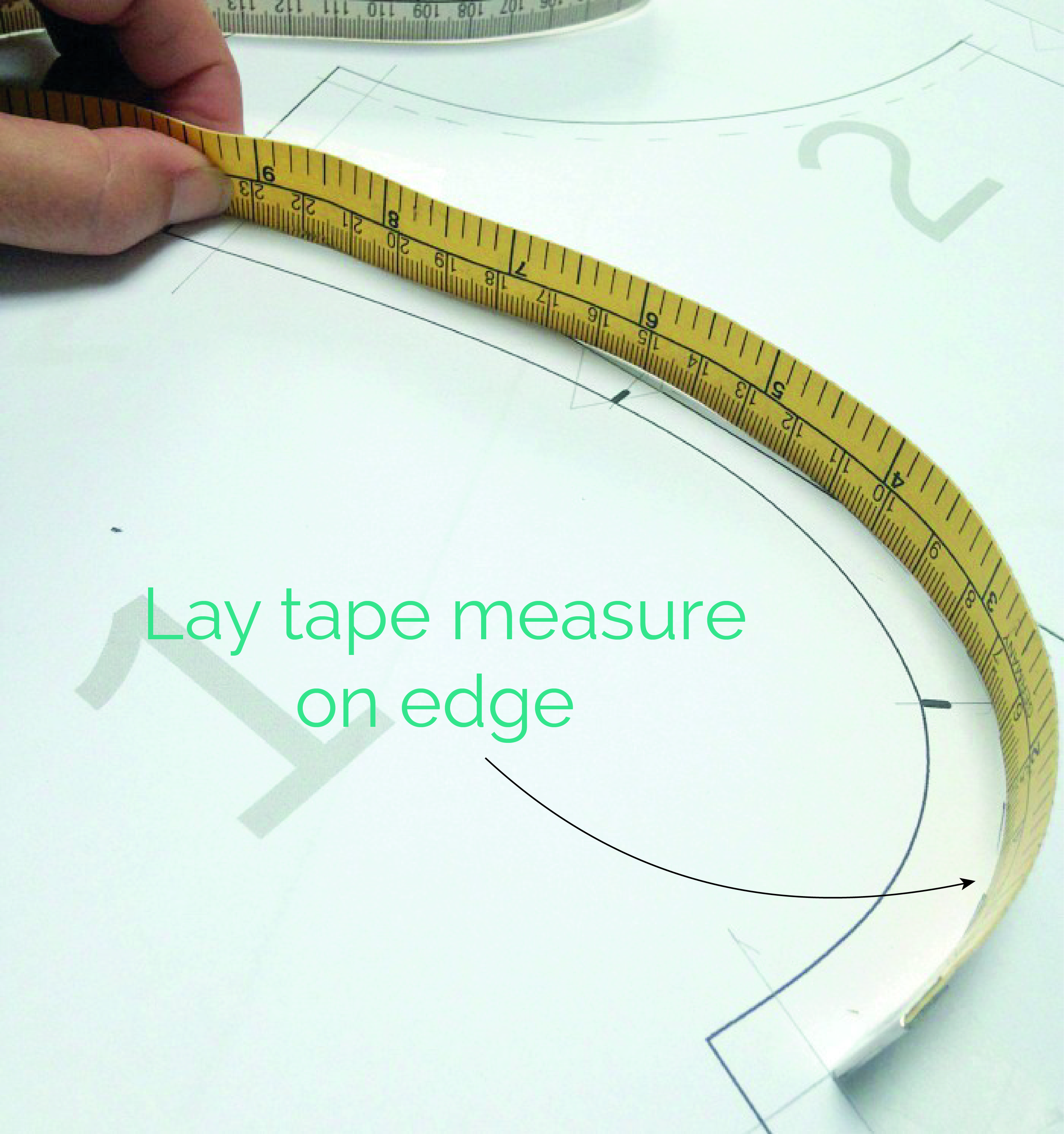
Next grab your tape measure. Here’s the trick. Stand it up on its SIDE and walk it EXACTLY along your pencil line to measure that entire length of armhole – EASY! Make a note of the measurement, I always write them straight on the pattern piece.

  • Now use the same method to measure the curve of your sleeve head. Remember it will be bigger than the armhole as it should have some ease in it.
  • You can see here that I don’t include the side seam allowances when I measure. As a general rule when measuring your pattern the trick is to just be consistent. It’s really easy to get confused and include the seam allowance in the armhole and then not on the sleeve head or sleeve cap. And then it takes a while to work out why the pattern pieces don’t fit together!
  • When I’m measuring a sleeve head to check it fits into the armhole I don’t measure the whole sleeve head in one go.
  • I’ll either measure from the underarm seam to the top of the sleeve head, where it would align with the shoulder seam. And then the other half of the sleeve head.
  • Or if I want to check the position of the notches I’ll draw a line from each notch to intersect the seam line. Then I’ll actually measure in-between each notch so I can check the notches are all in the right place and will match up at the same time as checking the sleeve will fit.

That’s it! It can take a little practice to do it accurately, but who doesn’t love a low (no!) tech solution to a problem?

Happy stitching and curve measuring,

Mrs M x

Posted on

How to lengthen The Portland Shorts

If you wanted to change the length of your Portland Shorts, don’t let the curved shape of the hem confuse you! It’s a really straight forward alteration. The trick is just to avoid cutting through the curved area, if you are making your shorts longer, so the shape doesn’t distort and the proportions of the curve stay the same.

But I’m also going to talk you through shortening The Portland Shorts and cutting straight through the hem detail, so the split doesn’t get too high on the thigh!

We have the adjustment lines already marked on The Portland Shorts. It’s a staggered line so you can decide which method works best for you. The same principal can be applied to any pattern where you have a detail you’d like to avoid changing; in this case a curve but it could be a placket or a side split that you want to keep the same length. If you don’t have an adjustment line on your pattern just draw one on, keeping it at a right angle to your grain line.

Learn how to lengthen or shorten a shorts pattern

Tools

  • Your pattern (or copy of your pattern if you don’t want to alter your original)
  • ruler
  • pencil
  • tape
  • Paper

Things to be aware of

  • If you are doing lots of alterations to your pattern, do any length adjustments first.
  • Keep the grainline or “place to fold line” IN A STRAIGHT LINE, do not allow them to stagger.
  • The Chain Effect: when altering one pattern piece, also alter the corresponding pattern piece in the same way and remember to check they still fit together after your alteration. In this case, the length of the side seams and in-seams will need to match.

ADD LENGTH TO THE PATTERN

First decide how much longer you would like your shorts. You can measure yourself or an old pair of favourite shorts.

Cut along the adjustment lines marked lengthen (highlighted in the picture) and separate the pattern piece. The line is staggered to avoid cutting through the curve of the hem.

LENGTHEN 

Place a piece of paper behind your pattern and tape the top portion of your pattern to it.

Extend the grain line. Draw a line parallel to the your adjustment line the amount you need to lengthen the pattern by. Tape the lower portion of your pattern to the new line, matching up the grainline. 

Join the pattern pieces back together by re-drawing the seam lines so that they are a smooth line. Then cut away any excess pattern paper.

SHORTEN

When shortening your pattern if you use the upper section of the adjustment line, the split will move upwards and potentially could sit quite high on your leg and possibly interfere with the pocket. To keep the upper most point of the split in the same place when shortening your shorts, use the lower section of the adjustment line.

First decide the amount you want to shorten your shorts by. You can measure yourself or an old pair of favourite shorts.

Cut along the adjustment lines marked shorten (highlighted in the picture) and separate the pattern pieces.

Place a piece of paper behind your pattern and tape the top portion of your shorts pattern to it.

On the pattern, draw a line parallel to the your adjustment line the amount you need to shorten the pattern by.

Overlap the pattern pieces to shorten, taping the lower portion of the pattern to the new line and matching up the grainlines. 

Re-draw the in-seam and the hemline to make sure they are a nice smooth line. Then cut away any excess pattern paper.

REPEAT AND CHECK! 

Make sure to do the same alteration to the front and back leg, and double check they are the same length before cutting out!

All done! Off you go and enjoy those shorts!

Posted on

Our New Pattern Collection Bundles

Save & Sew with our New Pattern Collections

I’m so pleased to introduce our new limited edition pattern collections!

With up to 15% off you can happily Sew and SAVE with our exclusive and limited edition sewing pattern bundles. They are available in PDF and paper and also include our new MAVEN1832 patterns.

The Holiday Pattern Collection includes The Joy Dress, The Barcelona & The Simone Set, all perfect for the summer sun and make the ideal me-made holiday capsule wardrobe.

The Essential Collection Pattern Bundle contains 3 of my most favourite and most used sewing patterns; The French Dart, The Maria Apron & The Somerset.

And we do like you to make the most of your sewing patterns so don’t forget to take a look at our free tutorials for tips and pattern hacks.

There are many more collections to explore! I’ve had such fun putting together these little Mini Collections. I will be changing them so if there is a collection you’d like to see, let me know!

join the gang! NEWSLETTER SIGN UP!