Posted on

How to use the Layers Feature when printing PDF patterns

Have you ever wondered how to use the layers feature when printing a PDF sewing pattern? Our quick little guide will help you to easily turn layers within your PDF pattern on and off so you can just print the sizes you need. Using the layers feature in Adobe Reader when printing your PDF sewing pattern can make complicated patterns or ones with lots of sizes easier to follow and can help you save some ink, which has got to be a good thing .

Learn how to print and assemble a PDF sewing pattern at home with our easy and straight-forward PDF PRINTING GUIDE HERE.

HOW TO USE THE LAYERS FEATURE TO PRINT A PDF SEWING PATTERNS

The Layers tool is great, it means you can toggle sizes on and off and only print the size (or sizes) you want. I know, it’s really quite splendid! One snag, it’s currently only available on the desktop version, not the mobile App version of Adobe Reader.

So how does it work? Well, want to make a size 16?  Toggle off to ‘Hide’ the other sizes and just print that one size 16. Or, are you between a size 10 and 12? Turn off the other sizes and leave the two sizes you want visible before printing, this makes it easy to see and blend your between your sizes now. 

No more pick a line, and hope you’re cutting the correct one for your size, there only is your size. And, as a little added bonus, only printing the size you want saves ink too!

Oh yeah, like I said, layers is a great feature!

So you’re convinced LAYERS is amazing, so here’ s how to use the layers feature:

(Not convinced? You can just leave them all on and carry on as usual and print the full range of sizes)

Open up your layered pattern and make sure you are using the latest version of Adobe Acrobat Reader.

MAVEN PATTERNS LAYERS TUTORIAL 2016

On the left you can see a menu, look for the LAYERS icon. It looks like 3 diamonds (or sheets of paper, I can’t decide) on top of each other.

MAVEN PATTERNS LAYERS TUTORIAL 2016

Click the LAYERS icon to open and a panel will fly out, showing two options if you have a combined instruction and pDf pattern file. The first bar is for the Maker Instructions (the instructions have NO layers) and the second bar is for the PATTERN (later patterns will not show the instructions option).

CLICK the + icon on the PATTERN HEADER BAR to release the DROP DOWN MENU.

MAVEN PATTERNS LAYERS TUTORIAL 2016

TA-DA! All the layers are listed so you can easily select your size(s). To toggle the layers on and off, just click the eyeball icon next to each layer name.

MAVEN PATTERNS LAYERS TUTORIAL 2016

Leave the eyeball ON to print a layer, eyeball OFF to hide a layer. Now you see it, now you don’t!

LOCKED LAYERS

For this pattern you can see two layers are locked, the pocket layer and the tiling layer that contains pattern and the print test square information relevant to every size. This will vary slightly from pattern to pattern but the locked layers will protect the layers you really don’t want to turn off by mistake. 

TOP TIP: Before you print, just double-check you have everything you want to print selected because the only thing worse than a pattern with lots of lines, is a pattern without any lines! And don’t forget to print the test square.

So there you go, all the benefits of a layered pattern in one little post. Enjoy!

join the gang! NEWSLETTER SIGN UP!

Posted on 6 Comments

The Maria Wrap Apron UPDATE

The Maria Wrap Apron - PDF Sewing Pattern

The Maria Wrap Apron Update

Maven Patterns The Maria Wrap Apron

I’ve done a little re-vamp on the maker instructions for The Maria Wrap Apron.

I’ve added some hyperlinks – Wahoo! – so now if you are viewing your instructions on a screen you can get a direct link to the relevant tutorial if you need it.

I know a lot of you view your instructions on iPads or laptops while sewing up a storm, so hyperlinks can be really useful. Personally, I have to print everything as the computer/office bit/corner of the kitchen is downstairs and sewing studio is upstairs. Obviously, hyperlinks won’t work if you print your instructions as I have too… I’m good but I’m not that good 😉 I’ve also added some pretty colours, because Hey! pretty colours…well, why the hell not?

So just for clarity: there are NO CHANGES TO THE ACTUAL PATTERN OR HOW TO MAKE THE APRON, I’ve just added a few little pretties so the maker instructions have the same features that are already on The Wendy Smock instructions.

If you have already bought The Maria Wrap Apron PDF sewing pattern and would like an updated Maker Instruction file, send me an ETSY convo and I am very happy to email you one – for FREE!

What other features do you like to see in your patterns and maker instructions?

Lots of detail and explanation?

Or do you do the same as my friend Maria (the inspiration for The Maria Wrap Apron) She may (maybe) give the maker instructions a fleeting, cursory glance before completely ignoring them and doing her own thing, only going back to the instructions if necessary.  I’m with Maria (it’s why we’re friends, that and we bonded over how much we hated cooking the small people’s tea after school – it cut into valuable making time – true story. Beer and curry is also part of that story, but I’ll spare you that part…). I’m just firmly of the opinion there is more than one correct way to stitch anything, and you learn from each mistake. So ignore away if that works for you, or read every word and ask all the questions you like – it’s all good ladies!

Posted on 18 Comments

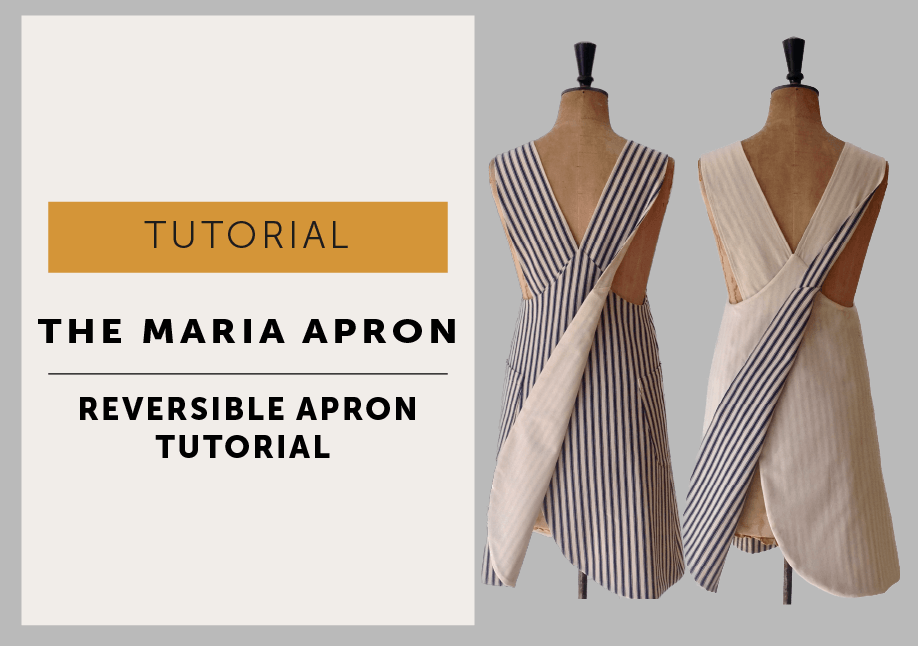
The Maria Wrap Apron Reversible Tutorial

How to Make a Reversible Maria Apron

I’ve seen some lovely reversible  Maria Wrap Aprons appearing by way of the growing band of happy #mavenmakers. I’m so delighted to see your makes and you’re a very creative bunch!

I’ve had many-a-request for a tutorial of how to make a reversible version. It’s not too complicated, and as with most things there is always more than one way to do it, but this is the method I found the easiest.  Do feel free to share your process…I’m all about an easy make!

The Maria Wrap Apron Reversible Tutorial

Arm yourself with the original instructions – to keep this tutorial shorter you’ll need to refer back to them for the full maker instructions.

Be sure to use the seam allowances as stated in the instructions.

CUTTING OUT: we are making Version A of The Maria Apron in this tutorial.

  • Use the FRONT (pattern piece 1)
  • BACK (pattern piece 2),
  • POCKET (pattern piece 7) 
  • TOP STRAP PATTERN (pattern piece 3)
  • DO NOT cut understraps or facings.

CUT 1 set for body A in fabric choice 1 (I’ve used a striped ticking from Ditto fabrics)

Cut 1 set for body B in fabric choice 2 (ideally equal in weight and density to fabric A, so one fabric doesn’t show through the other when reversed.)

*Please forgive my fabric choice 2…I’m currently working on a ‘use fabric from the stash policy only’ or I end up wasting days looking for the ‘perfect’ cloth. So my reversible apron is less reversible, more lined and without pockets in calico.

FACINGS: do not cut in fabric, ONLY cut 1 set in fusible interfacing (I made mine 2cm narrower than the pattern)

UNDERSTITCHING: in the instructions when it tells you to understitch, DON’T – doesn’t apply to a reversible one.

OVERLOCKING/NEATENING OF SEAMS:  They’ll all be enclosed between the two layers so don’t bother. YAY!

Don’t forget to press as you go, that’s my very TOPPIEST TIP for a professional looking garment.

Test your topstitching tension, it’s going to need to look good on both sides of your garment.

STEP 1: INTERFACING

Maven Patterns: The Maria Wrap Apron reversible tutorial

Fuse the interfacing onto the wrong side of one of your fabrics, doesn’t matter which one, but I’d advise doing a little test first to make sure it doesn’t show through on your fabric (it really showed through on my calico).

Follow the instructions and make up bodies A + B of the Aprons, complete with pockets. Don’t overlock or neaten the seams, they’ll all be enclosed so as I said before, there is no point!

STEP 2: MAKE THE STRAPS

Maven Patterns: The Maria Wrap Apron reversible tutorial

Make up the straps (one A + one B for each strap) and turn through. This is where we deviate from the instructions…don’t understitch the straps. Normally you’d want those seams to sit to the underside of your strap (that’s why there is an understrap pattern, it’s slightly smaller so the seams roll to the underneath) but as we are doing a reversible one it needs to look good from both sides, so our seam is now going to sit exactly on the side, neither to the front OR the back. Practise on your straps – you’ve got to do the same on the armhole in a minute. Topstitch your straps, neatly does it, remember it’s going to show on both sides.

STEP 3: ARMHOLE

Maven Patterns: The Maria Wrap Apron reversible tutorial

Place body A + body B with RIGHT SIDES TOGETHER (RST), use a 6mm seam allowance and stitch together at the armholes only. Turn back to the right side, so the seam allowance is enclosed and press.

STEP 4: ATTACH STRAPS 

Follow the instructions and attach the straps to body A. Just check they’re correct before you continue, you’ll thank me if you’ve got it wrong. All good? Great, let’s carry on then…

STEP 5: FRONT NECKLINE

Maven Patterns: The Maria Wrap Apron reversible tutorial

With RST pin and then stitch A + B together. Cut off the bulk in the corners (as described in the instructions), turn back to the right side and press neckline flat.

STEP 6: BACK AND HEM

Maven Patterns: The Maria Wrap Apron reversible tutorial

With RST again, pin the backs together at the top edges (where the straps are placed) and then continue to pin down the back and all around the hem, make sure you line up the side seams.

Here’s the (not-so) secret to bagging out a fully lined/reversible garment, leave an opening to turn everything through – you are literally going to pull the whole apron through it after stitching to turn it to the right side. If you are just lining a garment (rather than making it reversible) I’d suggest leaving an opening on the side seam as it won’t show at all when you are wearing it. But, as this is reversible and has pockets that sit over the side seam, I’ve gone with leaving an opening on the back seam. It’s a personal choice thing…I could have just as easily left an opening at the hem.

Machine stitch A + B together, use the seam allowances stated in the instructions. Don’t forget to leave the opening on one side – mine is about 12cm long. Press your seam.

STEP 7: TRIM & PRESS

Maven Patterns: The Maria Wrap Apron reversible tutorialTrim away the excess seam allowance at the hem and around the curve so it will lie flat when turned through to the right side.

Turn the apron to the right side by pulling it through the opening. Now take your time and press the seam where you have joined A + B together, again you want that seam to sit exactly on the side so it neither favours A or B.

STEP 8: FINISH!

Maven Patterns: The Maria Wrap Apron reversible tutorial

Close the opening with a slip stitch, you shouldn’t be able to see your stitching when you’ve finished. Now you can topstitch around your Apron (all in the instructions). Personally, I left that stage off…

A: because I liked the look of my apron without it and

B: because my machine was in a bad mood, and I hate ropey topstitching so quit while I was ahead.

So that’s it, a fully reversible (or just fully lined) apron!

Off you go then….get stitching!

Posted on

How to Gather Fabric Tutorial

how to sew gathering a step by step tutorial

How to sew Gathering: An easy way to sew gathering.

I’ve always avoided sewing garments that had lots of gathering, it seemed like such a lot of work. But with my next pattern release, The Wendy Artisan Smock, I couldn’t really escape it as the whole neckline is gathered and then bound – talk about facing your sewing demons – I’ve now made so many samples, that gathering necklines has actually become quite therapeutic!

So anyway, there is always more than one way to stitch anything, but this is my straightforward method for how to gather fabric using a sewing machine.

UPDATE / I have a new gathering tutorial which a little more in depth – HERE

Maven Patterns - gathering tutorial

How to sew Gathering (as in The Wendy Maker Instructions)

Set your stitch length to the LONGEST possible stitch length for your machine.

You need to stitch 2 rows in the seam allowance, parallel to each other, the first about 3mm from the edge of the fabric. These MUST NOT CROSS each other! Leave long ends to the threads.

Maven Patterns - gathering tutorial

In the case of The Wendy Smock, we’re gathering a neckline that is to be finished with binding, so it’s quite a long run of gathering. I found the best way to manage this was to work in sections (front, back and shoulders), stopping and the restarting at each seam. If your run of gathering is too long, the threads break – trust me, that can be just a little bit annoying.

Pull up the two long threads that are facing you (ignore the ones at the back) and gently slide the fabric along until gathers form, you can work from both ends.

Maven Patterns - gathering tutorial

Continue pulling up the threads until your fabric is gathered to the correct measurement, then wrap the excess fabric temporarily around a pin to hold. Continue along the neckline until it’s all gathered.

Maven Patterns - gathering tutorial

Double check your gathering is pulled up to the correct measurements, try your Wendy Smock Top on and see if it sits right on you. More gathers will make a smaller neckline and less will make a wider neckline, remember to make a note of the new measurements if you change them! When you are happy tie the threads securely together to fix them – you could stitch them in place by hand if you prefer, especially if you are not finishing your garment now.
Then all you need to do is make sure all your gathering is spread evenly before you finish your neckline. Oh yeah, and don’t forget to set your machine BACK to normal stitch length, it’s not like I’d forget to do something like that…

Happy sewing! Mrs M x