Posted on

A Fresh Bloom

image of The Bloom Skirt-Narrow Fabric Hack

Recently, I had a little sewing dilemma with a new Bloom Skirt I was planning and had to quickly come up with a how to cut narrow fabric hack.

I had been gifted the most delightful vintage Italian brocade (thank you Sarah @OliveRoadLondon) but it was a little narrow for my skirt pattern. With a useable width of just 86cm (34″) the cloth was not wide enough to cut the front panel which normally is cut to the fold.

The obvious solution is to just add a front seam to make a 4 panel skirt. And if I had been working with a ‘casual’ fabric like denim that would have been a great idea. I could have made a really nice feature of the seam which would have looked like a deliberate design decision.

THE DILEMMA

This fabric, however, is a really gorgeous brocade and I didn’t feel that a centre front seam was going to look right whacked down the front of my skirt. And, obviously, the plan wasn’t to cut it in contrasting fabrics like the sketch above but the seam was still going to be more noticeable than I wanted. And yet, the fact remained that the only way to get the skirt out of the fabric is to cut 4 equal skirt panels instead of the front panel on the fold.

THE SOLUTION

As there is, in fact, no sewing law in the world that says you have to place those panels so the seams fall as expected at the centre front, centre back and the side seams, so I decided to rotate the skirt by 45° so the seams are ‘off-set’ and sit in a much more pleasing (to me at least) position.

You probably don’t really need a tutorial now you’ve seen the images, it’s all quite self explanatory, but I’ve started so I’ll finish*

CONSTRUCTION

Construction of the skirt will be the same as usual, but as the seams have moved keep in mind the pockets and zip will obviously not be placed in the side or back seam.

CUTTING

  • Completely ignore the front skirt pattern and cut your skirt using just the Back skirt pattern but cut 2 pairs instead of 1 pair.
  • Cut the waistband and pocket bags as originally directed.

POCKETS

The pockets can’t be placed at the side seams because there isn’t actually a seam at the side any more. They need to be placed on either side of the front panel. Use the template included in the pattern to mark the pocket notches on the panels.

TIP / I’m going to suggest you check the pocket bag placement before permanently sewing in place. I left mine in the original position and, while perfectly useable, they are a smidge low for me. If I make another I will raise their position by about 2cm (½”ish). I should point out I’m 5’2″ with short arms, so this may or may not be a problem for you. If you’ve already made a Bloom Skirt, slip it on and twist it around so the pocket is sitting roughly where the new seams will be and just see how it feels.

ZIP

As we no longer have a centre back seam, but now have 2 seams offset to each side of the Centre Back, you’ll need to pick a back seam to insert your zip into. I’m right handed so I have inserted mine into the seam on the right hand side (as worn), but again there is no sewing police so it’s your choice really.

SCALLOPS

I didn’t add the scallop hem to my skirt. Apart from being short on fabric, I don’t think my fabric particularly lent itself to sewing them, this brocade being quite bouncy and full bodied – not impossible but not a quick win either. And the scallop pattern wouldn’t fit across the width of the cloth anyway.

If you find yourself wanting the fancy scallop hem but lacking fabric width, consider cutting them on the opposite grainline so the paper pattern runs along the length of the selvedge – do check you are not going to have issues with the direction of any print design or fabric shading though.

The other option would be to keep the pattern on the original grainline but add seams to make each scallop section the same width as each panel.

I was really pleased with how my Brocade Bloom Skirt turned out, she’s be worn quite a few times already and I do hope this gives you a few ideas to experiment with your patterns!

* For my non-UK sewing friends: I’ve started so I’ll finish – is a little quote from Magnus Magnusson on Mastermind, a famous Brit quiz show.

Posted on 4 Comments

How to Print and Assemble a PDF Sewing Pattern

Learn How to print and tile a PDF sewing Pattern at home With this free Printing tutorial

This Maven Patterns tutorial explains how to print and assemble PDF sewing patterns at home. It details essential steps like testing print settings, trimming pattern tiles, and taping them together for accurate alignment. Additional tips include saving resources by printing selectively and using Adobe Reader for proper scaling.

Learn How To Print and Tile a PDF Sewing Pattern at Home.

The joy of PDF sewing patterns is that they are instant. PDF sewing patterns are also known as digital sewing patterns. They are designed to be printed at home on either A4 or US letter sized paper. They are made up of several pages (tiles) that are joined together to make a complete pattern. Once they are downloaded you can print as many patterns as needed. No problems making different sizes, or losing a pattern piece, no more fragile tissue paper! You can just re-print!

Just pick your PDF sewing pattern and download it. Now, you can start to use up that stash of fabric that is slowly threatening to take over the house. Admit it you’ve got one! I’ve got one, we’ve all got one…and if you don’t have a stash of fabric…you want one!

Putting your PDF sewing pattern together is a very simple process. Grab a cup of tea and follow this Printing a PDF pattern tutorial…

IMPORTANT UPDATE

  • We now include an A0 file with each PDF pattern. So you can print at a copy shop on a wide format printer.
  • Can you only see 2 pages to print at home? You have probably opened the Copy Shop File by mistake. Open and Print from the file that is included in with the Maker Instructions.
  • All patterns from The Somerset (pattern 08) onwards, the pattern and the instruction files are separate.
  • Save ink and paper. You will find a list of page numbers in the instructions so you can just print the pages you choose.

YOU WILL NEED


  • A printer
  • A4/US letter paper
  • Paper Scissors
  • Tape (transparent magic tape is the best – doesn’t yellow with age, it’s invisible, you can get pins through it)

How to Print Your PDF pattern

STEP 1

Download your pattern and save it to your computer.

Maven Patterns are also available through Etsy, and Etsy have a guide to help with downloading digital items.

To open your digital file you need an Adobe Reader, which you can download for free.

Please note: You can set your default PDF reader to one of your choosing on your computer. Apple computers often default to opening PDFs with ‘Preview’. Your pattern needs to be printed from Adobe Reader to make sure it prints at the correct scale.

Open your document and read it first!

You will find a set of instructions which include a cutting guide, fabric requirements, illustrated Maker Instructions and a glossary of terms as well as your pattern. It is not necessary to print everything. Save ink and paper by just printing the pattern and viewing your instructions on screen. You will find a list of page numbers on the CONTENTS page.

How to print and tile a PDF sewing pattern, printer settings image

Make a note of the page number for THE PRINT TEST SQUARE, this is ALWAYS the first page to print. 

A PRINT TEST SQUARE is included on all digital sewing patterns. It is important so you can check that your printer is printing your pattern accurately. My patterns have a square 10cm x 10cm / 2″x2″ square. Check the size for different pattern designers – it will be clearly marked.

STEP 2

How to print and tile a pattern: Adobe Acrobat screen shot to show printer settings

IMPORTANT: Ensure your print settings are correct, the pattern must print at actual size or it won’t fit you! These print settings all vary a little , on my computer (a PC) I use these options, yours may be different:

  • Select your printer in the top left corner.
  • PAGE SIZING AND HANDLING: CUSTOM SCALE: 100% (also might say ACTUAL SIZE/ SET SCALING TO 100%/ TURN OFF SCALING),
  • PAGES TO PRINT: PAGES and tap in the page number of the print test square (19 in this case),
  • ORIENTATION: AUTO/PORTRAIT LANDSCAPE to keep your pattern tile centralized.

STEP 3

Print the TEST SQUARE page.

How to print and tile a PDF sewing pattern, a print test square image

Check the square measures 10cm x 10cm, if it does great – you’ll print an accurate pattern. If it doesn’t go back and fiddle with the print settings again.

Troubleshooting

  • Check you are opening with the latest version of Adobe Reader.
  • If you’re using a Mac and your pattern is opening in ‘Preview’, the default reader. Reopen in the latest version of Adobe Reader. FREE FROM HERE.
  • Give your pattern time to download completely. Save it somewhere safe that you can find on your computer.
  • Be sure to print from the SAVED version.
  • Printing a pattern that is open from your internet browser will cause the pattern to not print out correctly.

Check the printer settings

  • ‘Actual Size/Scale 100% should be TICKED
  • Make sure:  ‘Choose paper source by PDF page size’ is UN-TICKED.
  • Still not printing OK? Click ‘ADVANCED PRINTER SETTINGS’ then click “PRINT AS IMAGE”
  • It is important to use the latest version of Adobe Reader.
  • Make sure your printer is set to print on Auto portrait/landscape.
  • If you are using Apple mobiles that might be the problem. They won’t download and open a pdf file without a pdf app installed.
  • If you still have a printing issue; it’s time to check your printer drivers are up to date

Tiling Your Pattern

STEP 4

Once you are happy with your test square, you can print your pattern. Refer back to the contents page so you print the right pages. Soon you will have a stack of pattern tiles in front of you.

How to print and tile a PDF sewing pattern. how to trim the tile page of a PDF sewing pattern

The grey square is the outside edge of your pattern tile. Trim away the excess overlap on two sides. For absolute accuracy cut on the outside of the grey line, so you can still see it. Carry on until all the tiles are trimmed.

STEP 5

How to print and tile a PDF sewing pattern. A tile layout diagram

Each tile has a large grey number in the centre. These run from left to right so you can put your tiles in order. A TILE LAYOUT DIAGRAM is included in the instructions as each pattern will vary a little.

STEP 6

How to print and tile a PDF sewing pattern. taping a PDF pattern together

Tape or stick tile 1 to tile 2. Line up the triangles and the pattern as you go. DON’T OVERLAP THEM just butt the grey frame edges next to each other. I always use transparent magic tape for patterns. Sadly, it’s a little TOO transparent to show up in a photo…hence the lovely washi tape! Some people prefer a glue stick. There is no right or wrong, it’s just a preference. Keep working your way across row 1, and then do the same for row 2.

STEP 7

How to print and tile a PDF sewing pattern. joining a pdf print sat home pattern together

Join rows 1 and 2 together. Continue until your  pattern is taped together, using the tile layout diagram as a guide.

STEP 8

How to print and tile a PDF sewing pattern. cutting out a pattern

A whole tiled pattern can get a little unmanageable in one piece. Roughly cut out completed sections of the pattern as you go. Once you decide on your size, carefully cut out each pattern piece ready to make your garment.

And that, my sewing friend, is it!

Soon, you’ll be printing your PDF sewing pattern with confidence and tiling your sewing pattern together like a professional!

Happy sewing! Mrs M x

join the gang! NEWSLETTER SIGN UP!
Posted on 2 Comments

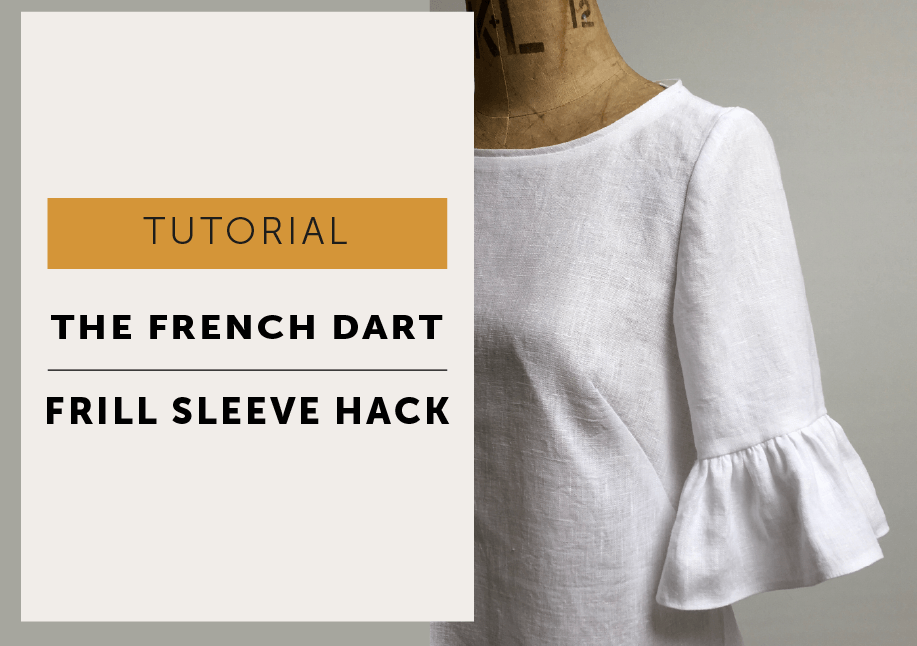
The Frill Sleeve Pattern Hack

Sleeves and frills are apparently the ‘thing’ this season.FRILL HEM PATTERN HACK_MAVEN PATTERNS

source images: gingham / pink / black / navy / stripe / ivory

As you can see from the mood board, frill sleeves are all the rage and anything goes! All you need to do is look for inspiration and decide the length and fullness you want. Take a close look at them…what will it be? The ivory one has a shorter sleeve length and longer frill compared to the black top which has a long frill and full length sleeves. Or the contrast stripe direction with a Breton feel. Maybe a double layer of frilly-ness is your thing. Personally, I love the gingham and the seam stitched to create a ruffled top edge. If you look carefully you can see a peplum at the waist done in the same style. If you want to create this yourself it is the same principle as the method below – a rectangle gathered up and just stitched on. This is a very simple pattern hack that will give you extra mileage out of  The French Dart Shift pattern (or indeed any pattern). And here’s the real joy…when you are fed up with frills at your elbows, just chop them off and you are left with a classic top that you will be able to continue to wear for years. No wasteful transient fashions for us!

MAKE A FRILL SLEEVE – METHOD

S/A: seam allowance | RST: right sides together

FRILL HEM PATTERN HACK_MAVEN PATTERNS

Trace the sleeve pattern. Decide the length you want the sleeve to finish without the frill. I wanted my frill to sit just above my elbow so I made my pattern 24cm nett (without seam allowance) in length and then added a 1cm hem allowance to attach the frill with. Check you like the hem circumference width, if you need to adjust it, now is the time but remember you need to be able to bend your arm.  I made the size 10 pattern with a 36cm finished hem circumference. (I’m 5’2″ so you may need a longer sleeve than me :/ Just measure your overarm or a garment you like.FRILL HEM PATTERN HACK_MAVEN PATTERNS

FRILL HEM PATTERN HACK_MAVEN PATTERNS

Next, decide how much fullness you want in your frill. I worked on a 2:1 ratio so there is twice the length of fabric for the frill compared to the NETT hem circumference of the sleeve. You can add more if you want, it depends a little on your fabric. A finer fabric might want a bit more gathering than my linen. I did a test to check what it would look like before I cut out my garment.

The one on the left is 2:1 ratio (20cm length gathered onto a 10cm piece of fabric) and on the right 2½:1 (25cm length gathered onto a 10cm piece of fabric)

To make your frill pattern:

It’s not complicated, it’s a rectangle and you’ll need to cut 1 pair.FRILL HEM PATTERN HACK_MAVEN PATTERNS

To calculate the width of the frill pattern:  take the NETT sleeve hem measurement (without seam allowances) and multiply by the ratio amount of frill.

The depth of the pattern is how deep do you want your frill to finish – I made mine to finish 10cm.

EXAMPLE:

In my case with a 2:1 ratio –  PATTERN WIDTH is 36cm (nett hem width) x 2 = 72cm and depth is 10cm.

or  for more fullness with a 2½:1 ratio –  PATTERN WIDTH is 36cm x 2½ = 90cm and depth is 10cm.

Then add 1cm seam allowance all the way around the pattern piece. The grainline runs in the same direction as the sleeve, so along the shortest side of your pattern. You can change the grainline to run along the width if that works better for your fabric. If you are cutting stripes, they would look very nice running around, rather than down, the sleeve.

FRILL HEM PATTERN HACK_MAVEN PATTERNS

MAKE:

Make your garment up following your usual instructions. We will make the sleeves completely before setting them in.

SLEEVE: With RST, stitch the underarm seam, overlock and press open.

FRILL: With RST stitch the fold the frill in half so the shortest seams are together. Stitch with a 1cm S/A, overlock and press open.

Run 2 rows of gathering along one edge and pull up evenly to the sleeve hem measurement. FRILL HEM PATTERN HACK_MAVEN PATTERNS

FRILL HEM PATTERN HACK_MAVEN PATTERNS

Divide sleeve hem and frill into quarters, by folding in half and then half again and mark these points. With RST pin frill to sleeve hem, line up the at seams and the marks you just made to keep your gathering spread evenly. Attach the frill to sleeve hem with 1cm S/A. Check its all even and lovely before overlocking the seam and pressing upwards towards sleeve.

FRILL HEM PATTERN HACK_MAVEN PATTERNS

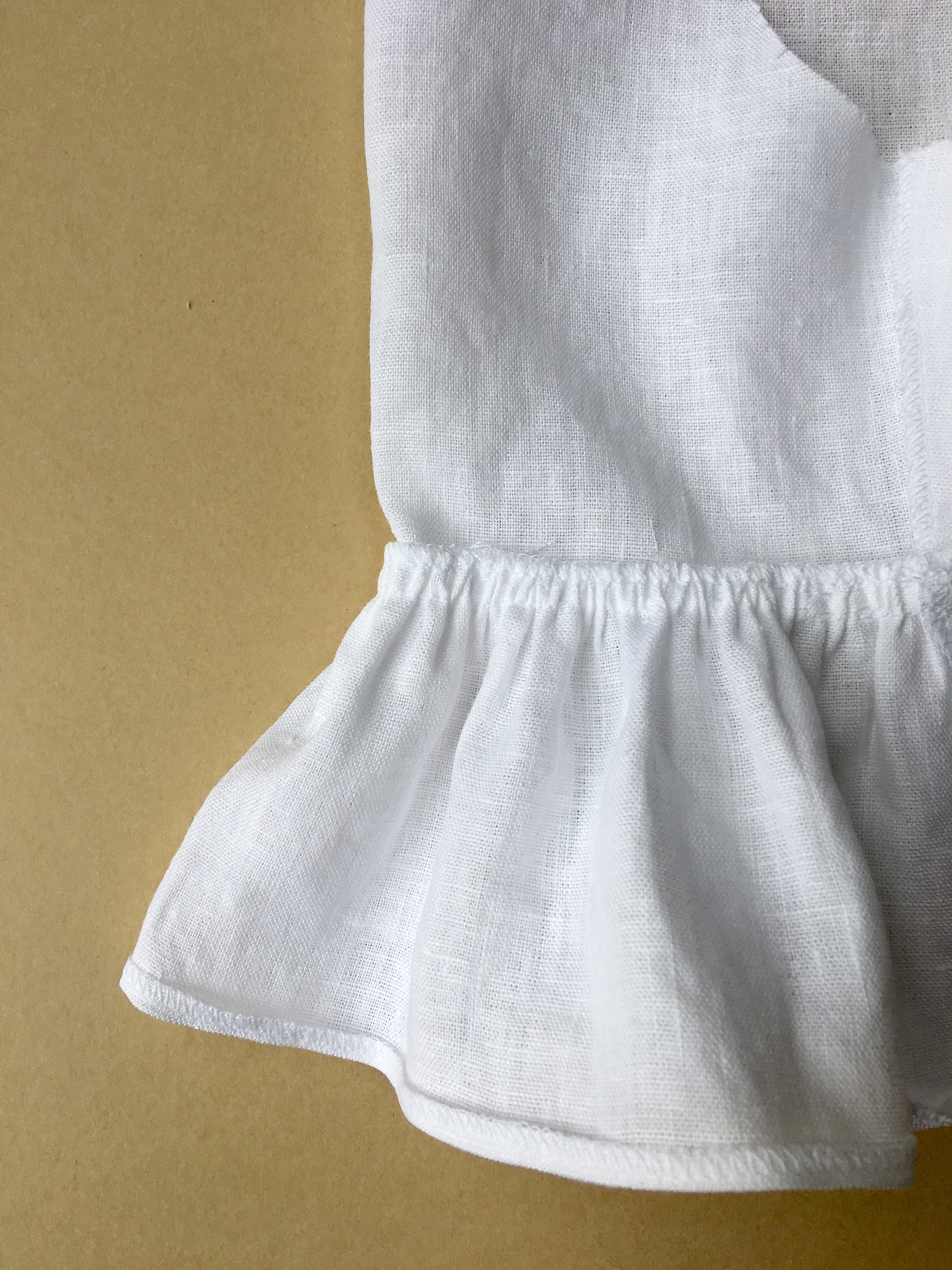
Overlock frill hem. Turn and press overlocking to the wrong side and edgestitch hem.

FRILL HEM PATTERN HACK_MAVEN PATTERNS

Give a press and then carry on and set in your sleeves and finish your garment.

And don’t forget when this frill sleeve trend has passed, don’t hide your French Dart Shift in the back of the wardrobe – chop off the frills and give it a new life!

Posted on

The Rochester – a new pattern!

MAVEN PATTERNS_THE ROCHESTER_DRESS FEATURED IMAGE

We have a new pattern release to share with all of you lovely sewing ladies… MAVEN PATTERNS_THE ROCHESTER

MAVEN PATTERNS_THE ROCHESTER_DRESS

I’m so pleased to put this style out, I’ve loved working on this new pattern so much!

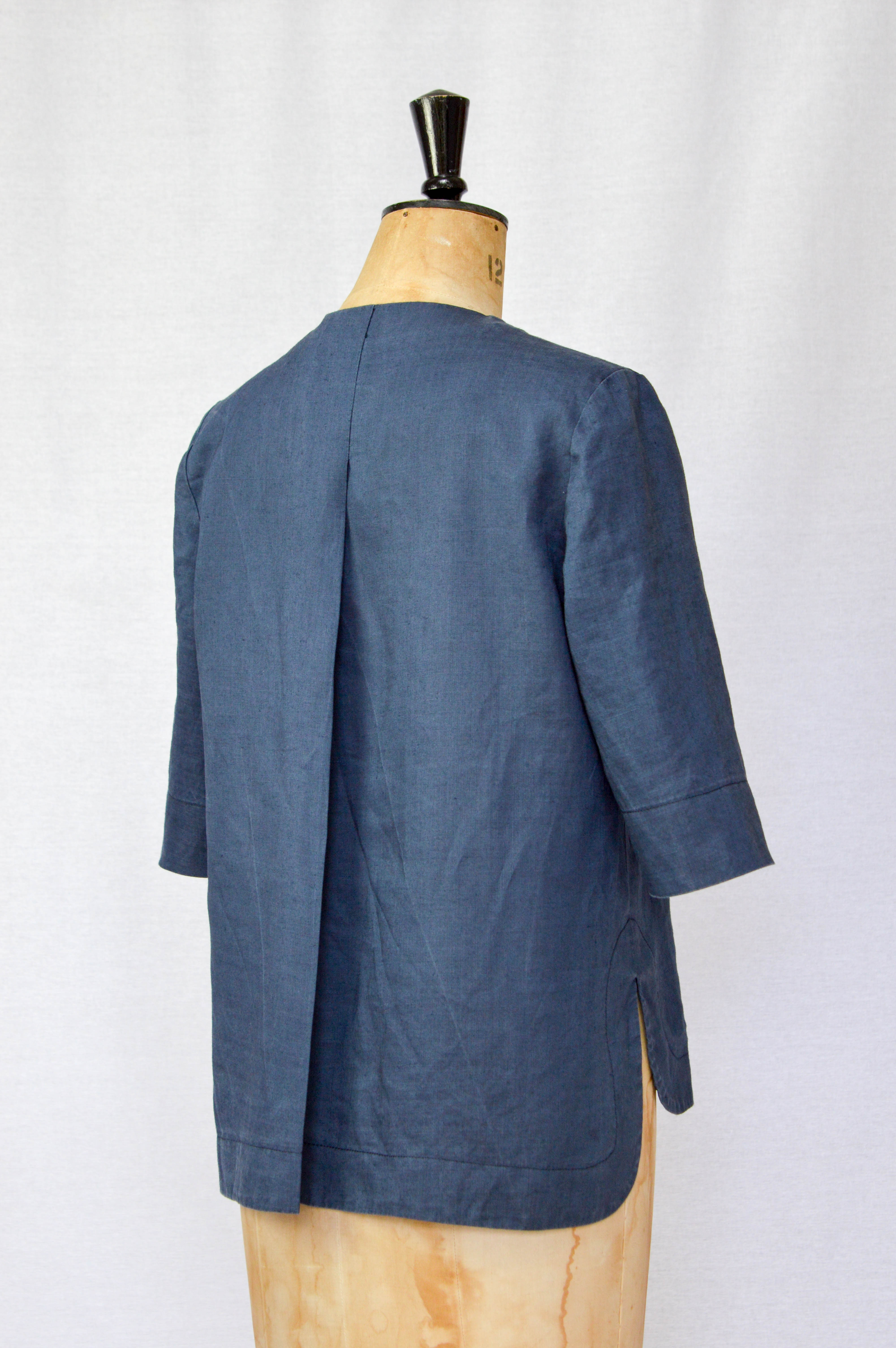
The Rochester has been designed with simple, understated styling in mind. She’s an easy to wear style with a relaxed fit and a slight A-line shape, but fitted at the shoulders for a flattering look. She has a deep centre back pleat, curved hem and side splits with stitched facing and elbow length sleeves.

You have the option to make a top (approx. mid hip length) and a knee length dress. The neckline is elasticated and gathered, so NO ZIP needed – you’re welcome! The top has a small frilled edge on the neckline and the dress has a clean edge but as the pattern is exactly the same and the difference is in the construction they are totally interchangeable – even as you are making them!

We’ve set the sewing skill level as intermediate, the tricky bit is stitching the hem (see the tutorial here) but if you have a little experience and like a challenge, do join in the fun!

MAVEN PATTERNS_THE ROCHESTER_DRESS

MAVEN PATTERNS_THE ROCHESTER_DRESS 05

MAVEN PATTERNS_THE ROCHESTER_DRESS


DESIGN FEATURES:

  • SEWING SKILL LEVEL: intermediate
  • Version A: The Top (mid hip length approx)
  • Version B: The Dress with tie belt  (knee length approx)
  • Elasticated and gathered front neckline
  • Elbow length sleeves
  • Curved hem and side split with feature topstitching
  • Centre back pleat
  • In-seam side pockets (dress only)
  • NO ZIP!
  • Easy to shorten or lengthen, with guides on your pattern
  • Unlined

PATTERN FEATURES:

  • LAYERS FEATURE: select and only print the size(s) you want
  • MULTI SIZE PATTERN: UK SIZES 8-18
  • SEE PHOTOS FOR SIZE CHART & FABRIC REQUIREMENTS
  • Illustrated guide (ENGLISH ONLY) to printing your pattern and sewing your tunic
  • Fully supported with PHOTO TUTORIALS
  • Includes seam allowances.
  • Can be printed on either A4 or US letter paper, using ADOBE ACROBAT READER
  • A0 copyshop file (2 sheets)

MAVEN PATTERNS_THE ROCHESTER

MAVEN PATTERNS_THE ROCHESTER_DRESS

This lightweight linen has worked really well for the top, choose a woven fabric that will be happy to accommodate that gathered neckline…linens, chambrays, lawn or viscose. The dress is made in the most wonderful crepe but it wasn’t happy with the frill – hence the 2nd neck option.

MAVEN PATTERNS_THE ROCHESTER_DRESS

MAVEN PATTERNS_THE ROCHESTER_DRESS

This hem detail is one of my most favourite things – there is a template included in the pattern to give you a topstitch guide line to make life easier! I’ve also added ‘length/shorten your pattern here’ guidelines on the pattern for The Rochester so you don’t have to worry about the curves and the facing if you need to make any length adjustments. The dress is approximately knee length (Eve is 5’4″ as a guide).MAVEN PATTERNS_THE ROCHESTER_DRESS

Oh and pockets…always need pockets in a dress. Looks good without the tie belt too!

MAVEN PATTERNS_THE ROCHESTER_DRESS

I hope you all love our new pattern, The Rochester, as much as we do xxx

You can get 20% off the usual price until midnight (GMT) on Sunday (21/5/17)

no code needed, just head straight to Etsy!

MAVEN PATTERNS_THE ROCHESTER